
Registration and Access
Revised: August 31, 2026
Overview
Providers who wish to enroll with Minnesota Health Care Programs (MHCP) or make enrollment requests using the Minnesota Provider Screening and Enrollment (MPSE) portal will access the portal through the MN-ITS application.
The following sections will explain how different providers will access the MPSE portal.
Currently Enrolled Providers
If you are an existing MHCP-enrolled provider, you will access the MPSE portal through your MN–ITS account after logging into LoginMN. If you do not have a MN–ITS account, review the Welcome Letter with MN–ITS registration instructions sent by the Minnesota Department of Human Services (DHS) when your enrollment was initially approved by MHCP.
If you do not have your Welcome Letter or do not know what your MN–ITS username and password are, contact the MHCP Provider Resource Center.
If you or your organization has never accessed MPSE before, find detailed instructions for updating your enrollment portfolio on the Existing MHCP Providers - First Time Access manual page.
If you attempt to complete your enrollment application and receive the error message that your social security number (SSN), federal employer identification number (FEIN), or provider identifier number (NPI or UMPI) is already in use, follow the Retrieve Portfolio instructions to get access to your portfolio.
Providers Enrolling for the First Time
If you are a provider who is not currently enrolled with MHCP and wish to use the MPSE portal to enroll with MHCP, you must first complete registration with LoginMN.
Use the following steps to complete your new enroller registration for MPSE.
Steps for New Enrollers to Register for MPSE
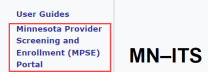
Once you have completed the registration process, log into LoginMN. Then, click the MN–ITS application to access the MPSE portal using the link on the left-hand side of the MN–ITS home page.
Screenshot of left-hand navigation in MN-ITS
Use the New Profile Request manual page for steps to complete the process to enroll with MHCP.
 Report this page