
Consolidated providers (type 33)
Page posted: 8/3/26
The federal government requires most payers to use the national provider identifier (NPI) number to identify providers. If a provider type does not fall under the federal NPI criteria, DHS assigns the provider a unique MMIS number called a unique Minnesota provider identifier (UMPI) number. Most waiver, Alternative Care (AC) and Essential Community Supports (ECS) provider types use UMPI numbers.
Both NPI and UMPI numbers replaced MMIS legacy provider numbers those providers previously used. The provider file application in MMIS stores these legacy numbers. A provider required to receive an NPI may have more than one MMIS legacy provider number associated with their NPI provider number. This type of provider is called a consolidated provider – provider type 33.
For more information about consolidated providers, refer to MHCP Provider Manual – Enrollment with MHCP.
Use a consolidated provider on a service agreement
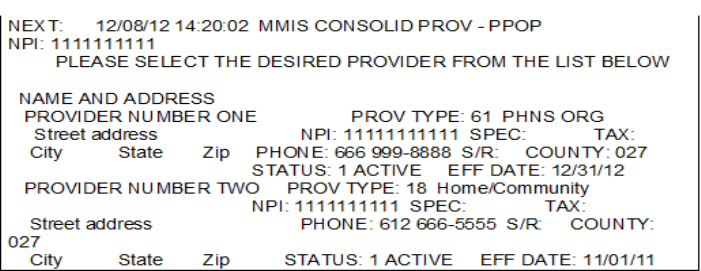
If you enter the NPI number of a consolidated provider on a service agreement line item, the provider pop-up (PPOP) screen appears when you press the transmit key or F9 on the line item. The PPOP screen lists the individual providers included under the consolidated provider’s NPI number. You must choose the appropriate provider from the PPOP list to enter on the service agreement.
To determine and select the appropriate provider:
1. Work with the provider to obtain information that defines the provider in the PPOP screen, including the address, the provider type and taxonomy (TAX) code.
2. Type X in front of the line of the appropriate individual provider on the PPOP consolidated provider list.
3. Press the transmit key to return to the ASA3 screen of the service agreement.
4. Press F9 to do both of the following:
5. Review and resolve the exception codes.
You might have selected the wrong provider if exception codes indicate that the provider is the wrong type, the status is not active and/or the category of service code is missing. In this case, retype the NPI number on the line item, press the transmit key or F9 and select another provider from the PPOP list. Contact the provider, if needed, and repeat the steps above.
Figure 1: The MMIS consolidated provider screen, called PPOP.
Additional resources
MHCP Provider Manual – Enrollment with MHCP
MMIS LTSS Manual – Create a new service agreement
 Report this page