

MnCHOICES Assessment v19.9 Release notes and companion documentation
9/13/2019
Purpose of release notes and companion documentation
This page is a visual, step-by-step document that describes how to use the changes made to specific functions and tasks for the MnCHOICES Assessment (MnA) computer application in version 19.9.
- To prepare for a future policy change, this release allows assessors to label reassessments as 65th birthday or Functional needs update (Change-in-condition). Additionally, MnA was updated with enhancements to the Developmental Disability (DD) screening document.
- Changes will require a change in URL address.
New feature with all future MnA releases
- Need to save data outside the assessment in an alternate format prior to the release
- Have to enter saved information back into the assessment after the release
Helpful Hint: Make sure you are in the current version of the MnA
- Log in to the MnA application, and select “User Profile” from the gray bar.

- Select “About MnCHOICES” from the User Profile dropdown choices.
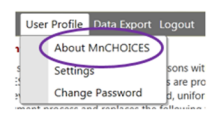
- The first sentence on this page will show you which version of MnA you are using.
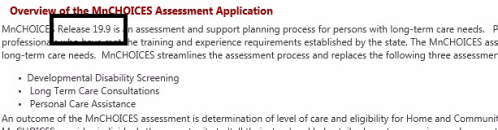
As you work in the new MnA release, here are the release notes:
DD screening document updates
- Previous functionality: Certain functionality did not exist in MnA which created inefficiencies for lead agencies during the assessment process.
New functionality: Efficiencies were added to the assessment process and fields in the DD screening document were updated and added in MnA.
NOTE: These fields are available for use by lead agencies immediately.
65th birthday and Functional needs (Change-in-condition) update: future functionality for coming policy updates
The MnCHOICES team added new features to support a future policy update for 65th birthday and Functional needs update. Functional needs and 65th birthday update are new, phone-based activities which will become available at a later date. Additional information and training will be available when these changes are made.
NOTE: We want to let users know about the visual change to avoid confusion, but we ask users to wait until DHS informs lead agencies about the changes before using the new assessment options.
- Previous functionality: Users would click an Add Reassessment button to start a reassessment of any type.
New functionality: A new dropdown menu was added for the user to choose the type of reassessment.
- Previous functionality: All reassessments in the Person and Activities screen used to be labeled as “reassessment” no matter what type of reassessment.
New functionality: New labels display that correspond to the type of reassessment selected from the reassessment dropdown menu.
- Previous functionality: The comment box on the Assessment Disposition tab was available for users to add information about assessment disposition.
New functionality: The comment box was removed to allow for the reassessment dropdown menu.
As you work in the new MnA release, here is the companion documentation:
DD screening document updates
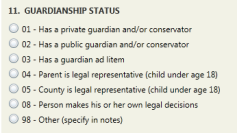
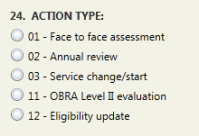
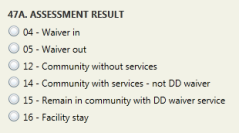
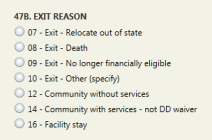
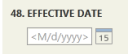
- Certain functionality did not exist in MnA which created inefficiencies for lead agencies during the assessment process. Efficiencies were added to the assessment process. The DD screening document fields “11. Guardianship status” and “24. Action type” were updated. Three new fields were added to the DD screening document in MnA; fields “47A. Assessment result,” “47B. Exit reason” and “48. Effective date.” Fields for current Medicaid services and county use were renumbered.
NOTE: These fields are available for use by lead agencies immediately.
-
- Before
Guardianship status Action type
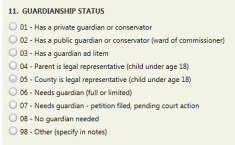
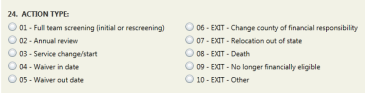
Assessment results, Exit reason and Effective date fields did not exist before the release.
-
- After
Guardianship status Action type
Assessment results Exit reason Effective date
65th birthday and Functional needs (Change-in-condition) updates
The MnCHOICES team added new features to support a future policy update for 65th birthday and functional needs update reassessments. When users begin to use the dropdown menu to select reassessment type, the updated labels will display in the Document History on the Person and Activities page. Those labels will also appear in the MnCHOICES Support Plan.
Functional needs and 65th birthday update are new, phone-based activities which will become available at a later date. Additional information and training will be available when these changes are made.
NOTE: We want to let users know about the visual change to avoid confusion, but we ask users to wait until DHS informs lead agencies about the changes before using the new assessment options.
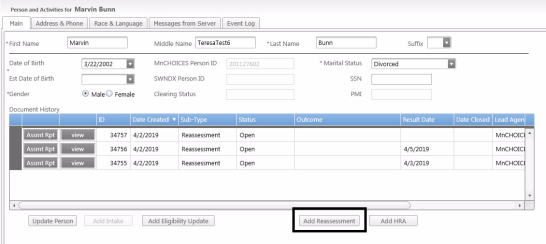
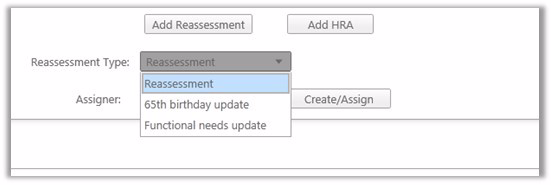
- Before the release, users would click an Add Reassessment button to start a reassessment of any type. After the release, a new dropdown menu displays for the user to choose the type of reassessment. The choices of reassessment labels are Reassessment, 65th birthday update or Functional needs update.
-
- Before
-
- After
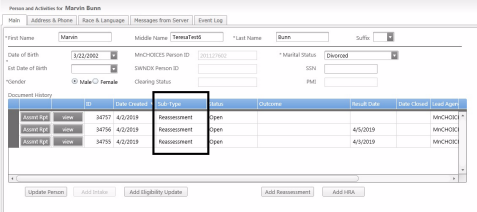
- Before the release, all reassessments in the Document History on the Person and Activities screen were labeled as reassessment no matter what type of reassessment. After the release, new labels display that correspond to the type of reassessment selected from the reassessment dropdown menu. New reassessment sub-type labels that display are Reassessment, 65th birthday update and Functional needs update.
a. Before
b. After
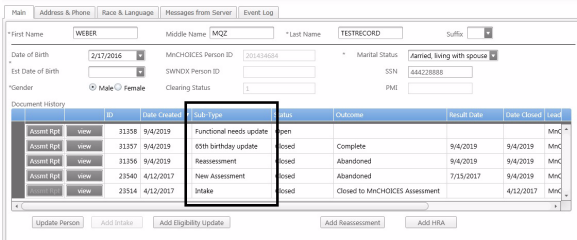
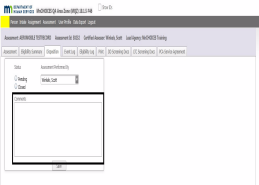
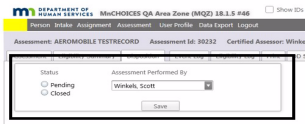
- Before the release, the comment boxes on the Intake and Assessment Disposition tabs were available for users to add information about intake and assessment disposition. After the release, the comment boxes were removed to allow for the reassessment dropdown menu. If necessary, users can enter notes related to administrative or abandonment events (e.g., outcome of assessment or program the person chose to access) in either the MnSP About Plan CSP General Plan Notes (Not intended for consumer) or MnA Assessors Conclusion domain notes comment boxes. The General Plan Notes (Not intended for consumer) comment box does not print and the Assessor Conclusion domain notes comment box prints in the Assessment Summary.
a. Before
Intake Assessment

b. After
Intake Assessment
 Report this page