

MnCHOICES Support Plan v20.9.1 Release notes and companion documentation
9/25/2020
Purpose of release notes and companion documentation
This page is a visual, step-by-step document that describes how to use the changes made to specific functions and tasks for the MnCHOICES Support Plan (MnSP) computer application in version 20.8.1. This release includes:
- DevExpress upgrade
- Corrections or enhancements to:
- Home Care Rating display in the Service Agreement Report
- Search results
- Calculating rates
- Emergency & Back Up Plans contact information
- Funding source matching agreement type
- Plan start and end dates displaying
- Edit or removal of demographic information
- Date of birth (DOB) and age fields
Changes in this release do not require a change in URL address.
NOTE: Some visuals in this document may look slightly different from the final version presented in the application.
As you work in the new MnSP release, here are the release notes:
- This release includes the DevExpress upgrade. This upgrade allows us to stay current with the software and continue to provide a positive user interface in the MnSP application. The users will not see any visual or functionality changes.
- Previous functionality: The Home Care Rating was not stored in the database and did not display in MnSP.
New functionality: We corrected MnSP to allow the home care rating to save in the database and display in MnSP and the MMIS Service Agreement Report.
- Previous functionality: Users would search for a person or plan, select a plan to view, and return to the search tab but the original search list was cleared from the screen.
New functionality: We enhanced MnSP to retain the search results when returning to the search page so the user does not need to complete a second search.
- Previous functionality: MnSP allowed users to set up future service lines and calculate rates before rates releases, which did not align with policy, or the releases.
New functionality: We updated MnSP so users can set up future service lines and complete rate inputs, but cannot calculate the rate until after each rates release.
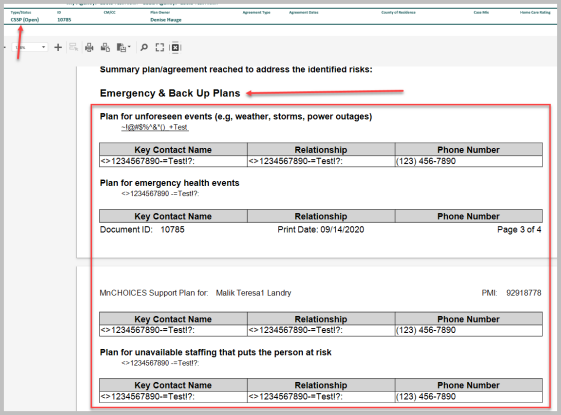
- Previous functionality: Emergency & Back Up Plans key contact name, relationship and phone number occasionally did not display in the Risk tab of the Coordinated Services and Support Plan (CSSP) but displayed on the CSSP preview and printout.
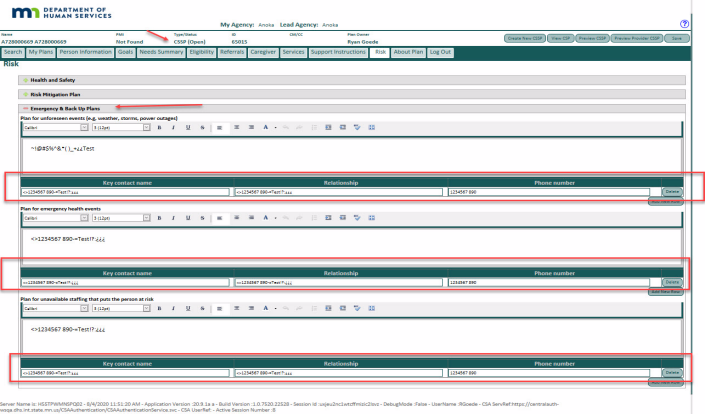
New functionality: We corrected MnSP code to allow the Emergency & Back Up Plans information to display both in the Risk tab and on the CSSP preview and printout.
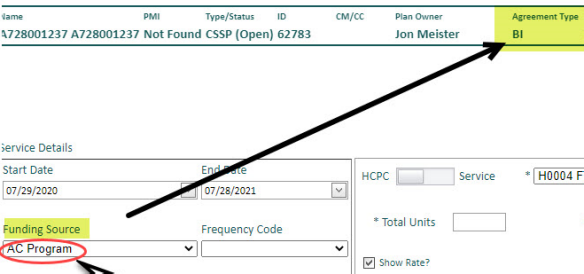
- Previous functionality: The Funding Source field automatically defaulted to “AC Program” regardless of the Agreement Type selected.
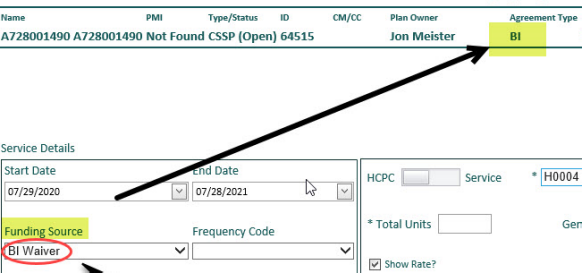
New functionality: We corrected MnSP so the Funding Source field now defaults to the value that matches the Agreement Type.
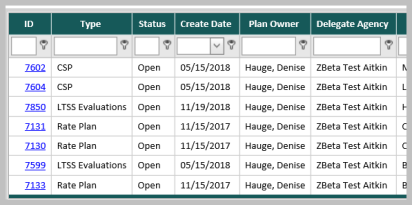
- Previous functionality: MnSP did not display plan start or end dates in the search results on the Search tab for Community Support Plans (CSPs), CSSPs and Rate Plans.
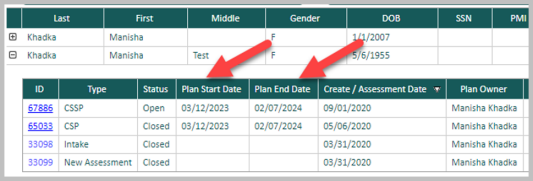
New functionality: We enhanced MnSP to display the plan start and end dates in the document records table for CSPs, CSSPs and Rate Plans.
- Previous functionality: MnSP had multiple issues with updates to addresses, emails and phone numbers and associated comment boxes.
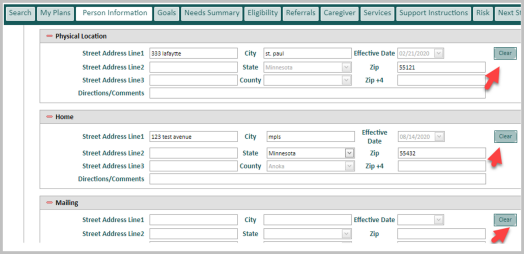
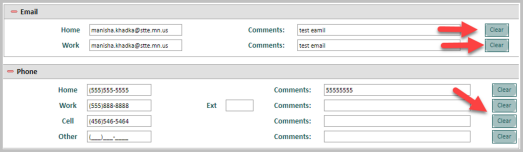
New functionality: We updated MnSP code to allow users to delete or change an invalid address, email or phone number, save and display user changes.
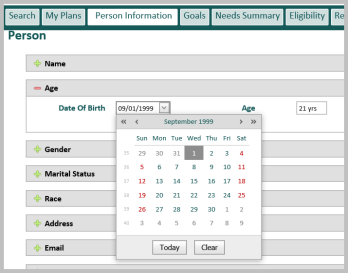
- Previous functionality: Users were able to change the DOB and age in the Person Information tab in MnSP, which caused multiple problems in MnCHOICES Assessment (MnA).
New functionality: We removed the ability to edit the DOB and age fields in MnSP.
As you work in the new MnSP release, here is the companion documentation:
- This release includes a DevExpress upgrade. DevExpress is a third-party software we use as a foundation to display many of the fields in MnSP such as drop down selection lists, multi-selection buttons and text fields. This upgrade allows us to stay current with the software and continue to provide a positive user interface in the MnSP application. The users will not see any visual or functionality changes.
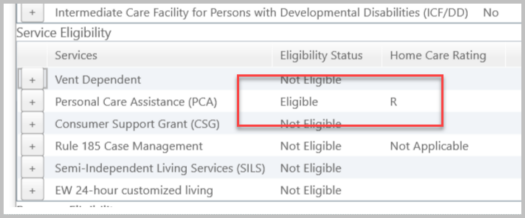
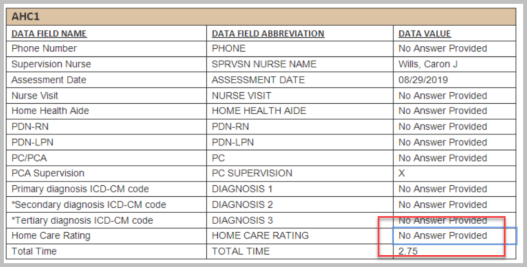
- Before the release, the Home Care Rating was not stored in the database and did not display in MnSP. A user would enter data and run eligibility. The person being assessed would qualify for home care services that would display on the Eligibility Summary but the Home Care Rating did not display in the MMIS Service Agreement Report. After the release, we corrected MnSP to allow the home care rating to save in the database and display in MnSP and the MMIS Service Agreement Report.
Before
After

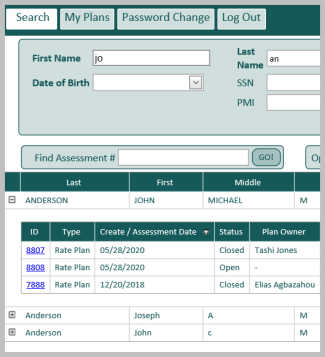
- Before the release, users would search for a person or plan, the list would display and the user would select a plan to view. If it was the incorrect plan, the user would return to the search page but the original search list was gone. After the release, we enhanced MnSP to retain the search results when returning to the search page so the user does not need to search again.
Before

After

- Before the release, MnSP allowed users to set up future service lines and calculate rates for Rate Management System (RMS) and Elderly Waiver Residential Services (EWRS) before rates releases. This did not align with policy or rates releases and caused future service lines to exist with retired service codes. After the release, we updated MnSP so users can set up future service lines and complete rate inputs, but cannot calculate the rate until after each rates release. MnSP will display an error message if a user tries to calculate the future rate before the rate release.
Example: Users will not be able to calculate rates for RMS or EWRS services with a start date of 1/1/2021 until after the rates release on Dec. 18, 2020.
Before screen shot does not provide any additional clarification
After

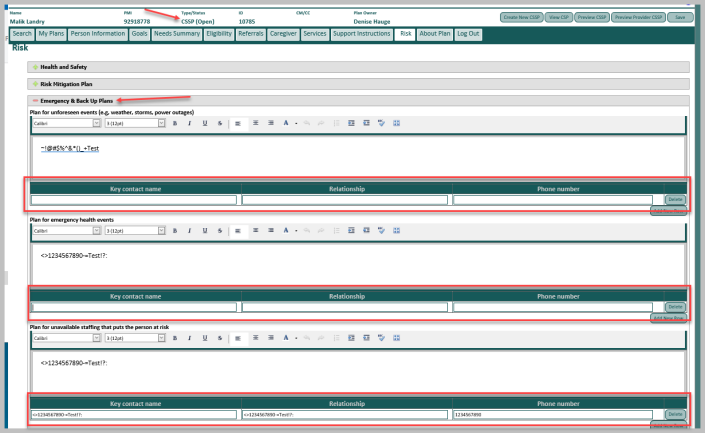
- Before the release, Emergency & Back Up Plans key contact name, relationship and phone number occasionally did not display in the Risk tab of the CSSP but displayed on the CSSP preview and printout. The two areas affected were the “Plan for unforeseen events” and “Plan for emergency health events” sections. After the release, we corrected MnSP code to allow the Emergency & Back Up Plans information to display both in the Risk tab and on the CSSP preview and printout.
Before
After
- Before the release, the Funding Source field in the service line automatically defaulted to “AC Program” regardless of the Agreement Type selected. We discovered this after the 20.8 release. After the release, we corrected MnSP so the Funding Source field defaults to the value that matches the Agreement Type.
Before
After
- Before the release, MnSP did not display plan start or end dates in the search results on the Search tab for CSPs, CSSPs and Rate Plans. After the release, we enhanced MnSP to display the plan start and end dates in the search results for CSPs, CSSPs and Rate Plans.
Before
After
- Before the release, MnSP had multiple issues with updates to addresses, emails and phone numbers and associated comment boxes. These issues:
- did not allow users to delete invalid address, email, or phone numbers
- would not allow new data to display in MnSP after users updated and saved addresses, emails and phone numbers
Users were required to enter other characters as placeholders to remove old data. If no data was entered, users experienced error messages about missing data. The MnSP database retained the old data and did not accept the updated information. After the release, we updated MnSP code to allow users to delete an invalid address, email or phone number. This update also allows the user to update and save data so the new information displays. The user no longer needs to enter other characters as placeholders to remove the invalid data. In addition, we added a “Clear” button for users to easily remove old data before entering new data.
Before

After
- Before the release, users were able to change the DOB and age in the Person Information tab in MnSP, which caused multiple problems in MnA. After the release, we removed the edit option of the DOB and age fields. Users can no longer change these two fields in MnSP.
Before
After

 Report this page