

Troubleshoot sign-in error message (Production environment only)
Problem
A user tries to sign into the production environment after getting the account creation email or and creating their password. Instead of opening the MnCHOICES dashboard, the user sees the “Incorrect user name and password” error message.
Note: A user can reset their own password with the forgot password button on the login screen.

Solution
1. Go to the production environment login page and select “Forgot your password?”.

2. Enter your username for the production environment and select “Reset my password.” The system will email a code to you.

3. The change password window shows part of the email address where the reset code was sent. Check the address to make sure the first letter and the first letter after the “@” are correct. Continue if the address is correct.
- If the addres is incorrect, ask your mentor submit a MnCHOICES Help Desk ticket that includes a screenshot.
4. Enter the code from the automated email and enter a new password.
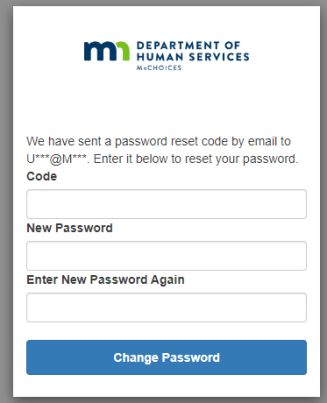
5. The system will automatically send you to the signin page after “Change Password” is selected. Remove any data in the username or password field. (This ensures your browser is not retaining old data.)
6. Enter your username and new password and sign in.
7. You will go to the acknowledge screen.

8. After selecting acknowledge, the system will send you to:
- The agency login page (if you work for more that one lead agency).

- “My Dashboard” (if you work for only one lead agency).

Help desk
If you follow these steps and cannot log in, ask your mentor to submit a ticket using the MnCHOICES Help Desk Contact Form, DHS-6979.
 Report this page