

Parent Support Outreach Plan
A Parent Support Outreach Plan (PSOP) is created in conjunction with services provided in the Parent Support Outreach program, and is reviewed with the family every 90 days.
Service Plans Folder – New State Service Plan – Parent Support Outreach Plan

 To open the Parent Support Outreach Plan:
- Right-click on the Service Plans folder and select New State Service Plan.
- Select Parent Support Outreach Plan from the Document template drop-down menu.
- The Setup tab displays.
 To complete the Setup Tab of the Parent Support Outreach Plan:
- Click anywhere on the Setup tab screen to enable data entry.
- Enter the Review Date in the Elements section.
- Select yes or no to display the language block at the end of the service plan.
- Enter the date the plan is Effective from in the corresponding field.
- Enter the date the plan is Effective to in the corresponding field.
- Select the name of the identified clients in the Persons Involved In Plan section.
- Select the current Address in the corresponding drop-down menu.
- To merge an E-mail address for a selected participant, click in the desired checkbox beneath the E-mail section. Each E-mail entered for a participant is available.
- To merge a telephone number for a selected participant, click in the desired checkbox beneath the Phone section. Each phone entered for a participant is available.
- In the Social Worker section, select the name of the primary caseworker in the Staff field. Any Document credentials or Phone entered for the primary caseworker in Admin will populate into the corresponding fields.
- Access the Action menu or click Save in the SSIS toolbar.
- Click on the Document tab.
Document Tab – Title Page – Parent / Legal Guardian Information Grid

 To complete the Document Tab of the Parent Support Outreach Plan:
- Review the information on the Title Page screen for accuracy, and answer the three questions in the corresponding Editor boxes. Click Complete.
- List any other clients or collaterals who are a part of this service plan in the Other Persons Involved in Plan Editor box. Click Complete.
- Answer the Editor box questions on the Plan Details screen. Click Complete.
- Enter the names of the required signers on the Signature Setup screen. Note that the Complete checkbox is already selected.
- Review the Navigation bar to ensure that each screen you wish to print displays with a red checkmark next to the corresponding node. Click Save.
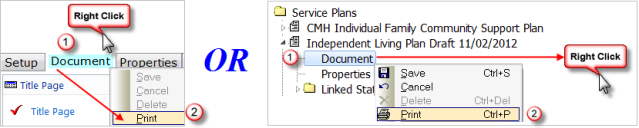
 Hint: To print the complete Parent Support Outreach Plan:
Document Tab + Print Document Node in Tree View + Print
 Report this page