

Person Master Index (PMI ) number changes
Updated 3/1/2024
This document includes (click on title to advance to the section):
Populating PMI
Purpose: To populate PMI numbers in the MnCHOICES Assessment application (MnA) when not imported from SWNDX at intake (e.g., PMI is not known at the time of intake).
- PMI number can only be populated in MnA when documents are open.
- Only new documents will show the new PMI number when populated in MnA.
- Previous documents will still have the old PMI number.
- The PMI number can be populated in MnA after a user creates the PMI number in MAXIS and populates SWNDX.
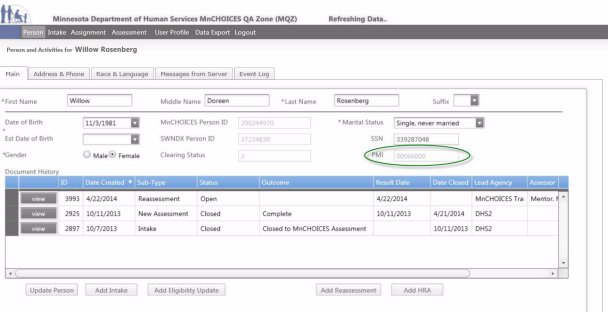
1. Go to “Person and Activities for [a person’s name].”

2. Select the update person button.

3. If a PMI number is in SWNDX, it will populate MnA (open documents, “Person and Activities,” screening documents, etc.).
Troubleshooting: If PMI does not populate
1. Verify all information is correct: Full Name, date of birth (DOB), Gender, social security number (SSN) and SWNDX ID.
- Make corrections as necessary.
- If SWNDX ID is wrong, report it to the MnCHOICES Help Desk.
2. Add a person’s SSN, if available.
3. Go to the person search page. Search for the person and check if the PMI is updated.
4. Contact the MnCHOICES Help Desk if the PMI is not updated.
Updating PMI
1. Send this information to the MnCHOICES Help Desk:
- Person’s name
- Old PMI
- New PMI.
2. MnCHOICES Help Desk will check if the PMI is available to be pulled into MnA.
- If available, the help desk will update the PMI.
- If not available, the help desk will instruct you to check back in a week.
Note: A PMI may not be available if it was recently added to MAXIS and has not finished processing.
Report multiple PMI issues
If a person using Minnesota Health Care Programs has more than one PMI number, it creates problems for Social Service Information System (SSIS) and other systems that use PMI numbers as unique identifiers. Multiple PMI numbers for the same person must be merged. Email a merge request to the TSS Help Desk.
 Report this page