

Initial assessment review: Detailed guidance
This webpage supplements . Review the CBSM entry before this webpage.
Definitions
External factors
External factors refer to eligibility or other criteria that are determined outside of a MnCHOICES assessment. These factors include but are not limited to:
- Determination of disability status (i.e., Social Security or State Medical Review Team [SMRT]).
- Determination for Medical Assistance (MA).
- AC financial eligibility.
- DD diagnostic determination process.
- A delay in proposed discharge date from an institutional stay.
Functional criteria
Functional criteria refers to what is determined by the MnCHOICES assessment that applies to level of care and/or program eligibility.
For example, the MnCHOICES assessment determines needs in areas like:
- Activities of daily living.
- Memory, using information, daily decision-making or behavioral needs that require intervention.
- Formal clinical monitoring at least once a day.
The MnCHOICES assessment does not determine criteria like:
- Medical Assistance (MA) eligibility.
- Certification of a disability.
- Diagnoses provided by a medical or mental health provider.
For example, a person might meet functional criteria for the Brain Injury (BI) Waiver but their SMRT determination is pending. This is an external factor. Review how this appears in the system in the MnCHOICES assessment results section shown below.
For more information, go to CBSM – Waiver and Alternative Care programs overview and CBSM – Level of care for more information.

Initial assessment with no level of care or program met
No functional criteria for institutional level of care and program were met
If a person did not meet functional criteria for any level of care or program, then an IAR cannot be used to open a person to a program following an initial assessment. A person whose needs or circumstances change to meet LOC or program criteria must have a new initial assessment.
Essential Community Supports
The Essential Community Supports (ECS) program requires that a person not meet level of care to access it. An IAR may still be used when a person 65 and older would like to access ECS but has pending financial eligibility criteria. CBSM – Essential Community Supports (ECS)
CFSS
Defining initial assessment
An initial assessment is an assessment completed for a person who is not currently receiving services through a waiver or other program. Because of MMIS constraints, all CFSS assessments are coded as “initial assessments.” However, for purposes of the Initial Assessment Review policy, annual assessments for people who have been receiving CFSS services are considered reassessments and cannot be followed by an IAR.
When a person is using CFSS before opening to a waiver
When a person has an initial assessment to access a waiver and would like to use CFSS before the waiver opens, an initial assessment review may be used to open the person to a waiver. Remember that the Type B service agreement must be closed before the screening document may be entered into MMIS and a new support plan with the program type must be created. The effective date of the waiver must be after the Type B service agreement closes.
When a person is assessed for CFSS but has pending external factors
When a person has an initial assessment for CFSS but has pending external factors, then an IAR must be used to open the person to the program. The IAR SD must be entered into MMIS as no program.
If the person was initially found eligible for a waiver and chooses to access a waiver at a later date, then another IAR may be used to open the person to the waiver.
Effective date
When to use the initial assessment activity date as the effective date for an IAR
The effective date should be the date a person will start receiving services of any kind (and within 60 days of the activity date). Therefore, using the activity date of the initial assessment should only occur when the person had already been receiving services requiring waiver or program funding.
(Note: External factors must have been met as of the activity date of the initial assessment.)
Example: A person had a MnCHOICES assessment July 1, 2025, while residing in a customized living facility and had requested Elderly Waiver (EW) funding to pay for these services. On Oct. 1, 2025, the assessor learned that the person’s MA was approved and backdated to Aug. 1, 2025. The effective date of the waiver span should be Aug. 1, 2025, and cannot be July 1, 2025.
Determining need for an IAR in the last 60 days
When the person needs an IAR
A user might need to use an IAR toward the end of the allowed 365-day validity policy (about the last 60 days). This most likely would be for people who are already receiving services and requiring program funding. Therefore, using the activity date of the initial assessment or when all criteria were in place, is needed.
When the person does not need an IAR
If external factors were not in place until the end of the allowed 365-day validity policy and the person did not have a need to use services immediately or before the date of the initial assessment review, then a new initial assessment would likely be completed. A new assessment would benefit the person more as the waiver span created by the IAR would be a maximum of 60 days.
When both an IAR and reassessment are needed
A user might need to use an IAR toward the end of the allowed 365-day validity policy. This might be the same time frame that a reassessment must be completed. A user may choose to use the same activity date from the IAR and reassessment if their lead agency is responsible for both and allowed by their lead agency.
Directions
When choosing to complete an IAR and reassessment on the same day, a certified assessor will need to create a MnCHOICES assessment form with assessment type = IAR. The IAR must be completed, an assessment summary must be completed and sent and the screening document must be entered into MMIS. Next, the certified assessor must create a MnCHOICES assessment form with activity type = Reassessment (RA). The assessment summary must be completed and sent and the screening document must be entered into MMIS.
A person turns 65 years old between the IA and IAR
A person who turns 65 years old between the activity date of the initial assessment and the activity date of the initial assessment review might be able to use a disability waiver if the disability waiver best meets their needs.
A person must meet the following conditions to be eligible for CADI, CAC or BI waivers after they turn 65 years:
- Be 64 years old at the time of the initial assessment.
- Meet functional criteria for a CADI, CAC or BI waiver (See Waiver and Alternative Care programs overview to view specific waiver criteria).
- Pending criteria became effective while they were 64.
Example: A 64-year-old person was assessed for programming and met functional criteria for a CADI waiver on July 1, 2025. Her SMRT application was pending until Nov. 1, 2025, when she had already turned 65. SMRT confirmed disability status as of the date of her application which was also July 1, 2025. So, she can use the CADI Waiver because SMRT became effective while she was 64 years old.
How to manage in MnCHOICES
When a person meets eligibility for and chooses to use a CADI, CAC or BI waiver after they turn 65 years old, the certified assessor must choose a result date that is before the person’s 65th birthday. This will provide accurate assessment results. (MMIS has been programed to allow this). The effective date does not have to be when the person is still 64 years old.
Multiple IARs
An IAR should only be used when the assessor confirms that the person is ready to open to a program.
Example: An IAR does not need to be completed for a person going on a BI Waiver when their MA application is approved and a SMRT determination is pending. However, there might be circumstances when multiple IARs are completed.
CFSS
- An initial assessment is completed for CFSS. There are pending external factors to open to CFSS.
- IAR is used to open a person to CFSS via the Type B service agreement.
- A second IAR is used to open a person to a waiver at a later date.
CFSS and MMIS
All screening docs must be entered into MMIS according to CFSS policy.
Waiver
- An initial assessment is completed for a waiver. There are pending external factors to open to a waiver.
- An IAR is completed because of a planned discharge from a facility that did not occur.
- A secondary IAR is completed to open the person to a waiver once the person discharges from the facility.
Waiver and MMIS
All screening documents must be entered into MMIS.
If an IAR SD resulted in opening to a program was entered into MMIS but the person did not open to a program, then the assessor must request a screening document deletion (see CBSM - Service Agreement and Screening Document (SASD) Support Team).
What to send to the person
Any time an assessment is completed, an assessment summary and NOA must be sent to a person. The lead agency does not need to complete the assessment and program acknowledgement including obtaining signatures or complete the MnCHOICES Assessment Summary Worksheet, DHS 6791A (PDF) as part of the IAR.
Tracking
Queries
A new query, “Initial assessment tracking,” will be available from the queries tab under MnCHOICES assessment.
Reports
A new report, “Assessments with pending criteria,” can be accessed by staff with certain roles via the reports tab. These roles include:
- Lead agency supervisor
- Delegate supervisor
- Contracted case management supervisor.
Tasks
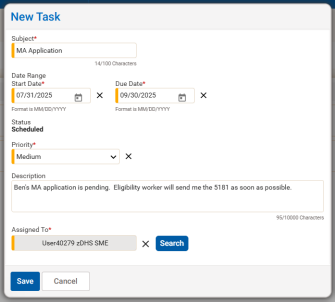
A task can be created by clicking on the tasks icon in a person record and selecting the new task button. Once a task is created, it will display in the my dashboard section in the my tasks tile.
Example of a new task:
Person is residing in customized living facility and EW funding is pending
When a person is receiving customized living services and requests an initial assessment for EW funding and the person is not able to open to the EW within 60 days, then the lead agency responsible for the MnCHOICES assessment must start a support plan.
Workflow example
July 1, 2025: A certified assessor assesses a person who is receiving customized living services for EW funding.
Aug. 29, 2025: The person’s MA (or other external factor[s]) is/are still pending.
- Certified assessor follows assessment protocol including moving the assessment to approved by MMIS.
- Lead agency staff creates a support plan form.
- Lead agency staff moves the support plan from in progress to in progress – assessment complete.
(Note: This is the status that the lead agency will keep the support plan in until a case manager or care coordinator is assigned.)
- Fill out all required fields and calculate a rate.
- Lead agency staff prints the support plan and uploads in attachments icon in person record.
(Note: This ensures that the assessed needs in the EWRS tool identified at the time of the initial assessment display accurately in the support plan print document.)

Go to MnCHOICES practice guide – MnCHOICES support plan form in the help center for assistance with creating a plan and for information regarding the EWRS tool.
Nov. 2, 2025: The certified assessor learns the person’s MA has been approved effective July 1, 2025.
- Assessor creates a MnCHOICES assessment with assessment type = Initial assessment review.
- If the person states they have had changes, the assessor updates the assessment information.
- Certified assessor follows assessment protocol including moving the assessment to the approved by MMIS status.
After Nov. 2, 2025: Case manager or care coordinator is assigned. (Some lead agencies might choose to have the certified assessor complete the following steps. Follow lead agency protocol). The case manager:
- Reviews the support plan that was started by the certified assessor or other lead agency staff for accuracy of dates.
- Updates the support plan effective date range and services and supports date ranges, if necessary.
- Adds additional services and supports to the new support plan.
- Completes remaining fields.
- Sends both the support plan located in the attachments icon and updated support plan to customized living provider If there were decreased assessed needs in the EWRS tool.
(Note: This ensures the provider can see the accurate component services in the EWRS tool in each version of the support plan.)
 Report this page