Organization Information
Posted: July 25, 2023
Overview
Your portfolio’s Organization Information page displays information related to your practice such as legal name, fiscal year end date, ownership type and email address.
If you are using these instructions to request a change of ownership, it is strongly recommended that you contact the Provider Resource Center and use Option 3 for enrollment questions.
Follow the instructions below to update your Organization Information in the Minnesota Provider Screening and Enrollment (MPSE) portal.
Steps to Update Your Organization Information
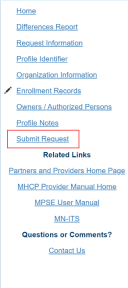
1. Once you have started a Global Request, the MPSE portal will take you to the Manage Profile Identifier page. 2. Using the Right-Side Navigation, click on the link for Organization Information.3. Update the information as needed in the Organization Information section.4. The Upload Supporting Documentation is optional but may make it easier for Minnesota Health Care Programs (MHCP) to verify your request. Click the Eye Icon and select a document to upload.5. If you wish to provide a note to MHCP for why you are requesting a change, click the Edit link in the Reason for Change Note field.6. Click Continue to save your changes.7. There will now be three options available to you:a. If you need to make updates to the Portfolio Identifier page, follow the steps for Portfolio Identifier.b. If you need to make updates to the Owners and Authorized Persons page, follow the steps for Owner or Authorized Person.c. If the Organization Information is the only thing you want to change in this global request, you can use the Right-Side Navigation to click Submit Request to submit your request for approval.
Screenshot of MPSE right-side navigation

 Report this page