MN–ITS Troubleshooting Guide
Revised: July 23, 2026
· Video Modules· Error Messages· Common User Questions· User Administration Error Message· Virtual Desktop Users
Video Modules
MN–ITS
· Accessing MN–ITS through LoginMN (4 min., 19 sec.)· Guide to the MN–ITS Home Page (9 min., 5 sec.)· Using the MN–ITS Mailbox (5 min., 33 sec.)· Functions and Features of the MN–ITS Claim Screens (8 min., 36 sec.)· Adding Taxonomy Codes for Consolidated Providers (5 min., 58 sec.)· Guide to the User Administration Section in MN–ITS (7 min., 4 sec.)
Billing
· Community Paramedic Services billing (10 min., 19 sec.)· Entering Coordination of Benefits with Third Party Liability (837P) (9 min., 13 sec.)· Entering Coordination of Benefits into an 837I Inpatient Claim (9 min., 43 sec.)· Entering Coordination of Benefits for Medicare Part B (7 min., 5 sec.)· Validating a Claim in MN–ITS (5 min., 29 sec.)· Sending an Attachment for a MN–ITS Claim (8 min., 44 sec.)· How to Read Your Remittance Advice (8 min., 5 sec.)· How to Read the Payer Claim Control Number (PCN) (4 min., 58 sec.)· How to Read the Payment and Claim Cut-off Calendars (5 min., 44 sec.)
Error Messages
Registration Error Messages
1. Error Page #1 User ID [resolution]2. Error Page #2 Database Connectivity Failure [resolution]
Other Error Messages
1. An exception was thrown: Unexpected exception during mapping [resolution]2. Unable to complete this transaction at this time: Unable to complete the host transaction [resolution]3. Your Claim, Transaction Control Number XXXXXXXXXXXXXXXXX, has been accepted for processing. The status of this claim is not yet known but you will be able to view it from this web site as soon as processing is complete. If you have any questions, please call the Minnesota Health Care Programs (MHCP) Provider Resource Center at 651-431-2700 or 800-366-5411 [resolution]4. Page Not Found or Page Not Available [resolution]
Common User Questions
1. Registration2. System Access3. System Functionality4. User Access, Logging In & Passwords5. Batch/X126. X12 Testing7. Remittance Advice (RA)
Registration
1. I forgot my password. [resolution]
System Access
1. I’m trying to get into MN–ITS and do not have access. [resolution]
System Functionality
1. MN–ITS is not responding or is not functioning properly. [resolution]
User Access and Logging In
1. I want to submit claims but see only options for “Administrator” and “Logout” on the left-hand menu. [resolution]2. I see a blank or white screen. [resolution]
Batch/X12
1. I sent a batch of production claims but have not received any results. [resolution]2. I received a 999 response from DHS and don’t know what it is. [resolution]
X12 testing
1. I tried to submit a batch of test claims or production claims and immediately received an error about a duplicate file name. [resolution]
Remittance Advice (RA)
1. I am not receiving my X12 835 RA in my MN–ITS mailbox. [resolution]2. When will my PDF RA appear in my MN–ITS mailbox. [resolution]3. I can’t open or retrieve my PDFRA file. [resolution]4. My PDF RA file is appearing as scrambled lines. [resolution]5. I want to direct my RA to the mailbox of another provider/biller. [resolution]6. I want to change my RA from NSF to X12 835. [resolution]
Resolutions: Error Messages
Registration Error Messages
1. Error Page #1 User ID
Refer to the LoginMN Registration Steps to Access MN–ITS (PDF) for more information about User ID for LoginMN registration and MN–ITS access.
2. Error Page #2 Database Connectivity Failure
A system error has occurred. Contact the MHCP Provider Resource Center at 651-431-2700 or 800-366-5411 and report your error code or description, User ID, date and time of session.
Other Error Messages
1. An exception was thrown: Unexpected exception during mapping
Contact the MHCP Provider Resource Center at 651-431-2700 or 800-366-5411 and report your User ID, date and time of session.
2. Unable to complete this transaction at this time: Unable to complete the host transaction
Contact the MHCP Provider Resource Center at 651-431-2700 or 800-366-5411 and report your User ID, date and time of session.
3. Your Claim, Transaction Control Number XXXXXXXXXXXXXXXXX, has been accepted for processing. The status of this claim is not yet known but you will be able to view it from this Web site as soon as processing is complete. If you have any questions, please call the MHCP Provider Resource Center at 651-431-2700 or 800-366-5411
Your request may have timed out. DHS received your transaction but was not able to respond in time with a MN–ITS claim response. Refer to your claim number for status inquiries. Contact the MHCP Provider Resource Center at 651-431-2700 or 800-366-5411 and report your User ID, date and time of session.
4. Page Not Found or Page Not Available· Make sure the web address you entered is https://mn.gov/portal/login/· MN–ITS may be down – scheduled system downtimes are listed on the DHS MN–ITS tile on the Minnesota Partner Apps page of LoginMN. · Contact the MHCP Provider Resource Center at 651-431-2700 or 800-366-5411 and report your User ID, date and time of session.
Resolutions: Common User Questions
Registration
1. I forgot my password.· Locate the email you received from noreply_prod@login.mn.gov. Note: Make sure to check your spam and junk mail if you do not find the email in your inbox. Your IT or a firewall may also be blocking or holding this email. Check with your IT department to see if they can find and release the email coming from noreply_prod@login.mn.gov.
· If you have lost your email, contact the MHCP Provider Resource Center at 651-431-2700 or 800-366-5411 (option 5).· You can reset your own password on the LoginMN page
System Access
1. I’m trying to get into MN–ITS and do not have access.
Contact your assigned PA to create a user profile for you.
System Functionality
1. MN–ITS is not responding or is not functioning properly.· Check for web browser compatibility. MN–ITS is compatible with Microsoft Edge, Google Chrome, Mozilla FireFox, and Netscape. Internet Explorer is not supported. The Apple Safari browser may be used to access RAs and downloads but is not compatible for claims submission. These browsers are available as free downloads at the following websites:· Check your browser’s “Internet Control Settings” or “Security Settings.” To function properly, MN–ITS requires “Per-Session Cookies” and “Allow Cookies To Be Stored On Your Computer” to be enabled.· MN–ITS Mailbox PDF files require a relatively current version of a PDF reader program installed on your PC. · You may have a Pop-Up Blocker program on your PC. Disable your anti-virus program while in MN–ITS. Contact your technical staff or your internet service provider for more information.· You may have an anti-virus program on your PC. Disable your anti-virus program while in MN–ITS. Contact your technical staff or your internet service provider for more information.· You may have firewall issues on your PC. Check with your technical staff or your internet service provider regarding possible firewall issues.· Your PC may be low on memory. Close all other programs if you are experiencing slow or no response.· MN–ITS is down. Contact the MHCP Provider Resource Center at 651-431-2700 or 800-366-5411 and report your User ID, time and date of occurrence.
User Access and Logging In
1. I want to submit claims but see only options for “Administrator” and “Logout” on the left-hand menu.· If you are not the PA, contact your PA to adjust your MN–ITS Application Role within your user profile.· If you are the PA,· Select “Administrator.”· Click on “My Identity” under the “User manager” toolbar.· Click on “Organizational Information” on your profile.· Click on the “Modify” button.· Click on the MN–ITS Application Role option “Interactive,” “Batch” or click on both.· Click on “Save” and “Logout.” The next time you log in you will see the appropriate menu view.· Select “MN–ITS Interactive”· Select from the options under “New Claim.”
2. I see a blank or white screen.
Contact the MHCP Provider Resource Center at 651-431-2700 or 800-366-5411 and report your User ID, date and time of session.
Batch/X12
1. I sent a batch of production claims but have not received any results.
Check your “Transaction Responses” option within your mailbox in MN–ITS Batch. If you have not received a 999 transaction within four hours of submission, contact the MHCP Provider Resource Center at 651-431-2700 or 800-366-5411 and report your Submitter ID (the NPI or UMPI of whoever is submitting the claim), time and date of batch submission.
2. I received a 999 response from DHS and don’t know what it is.
A 999 response is an X12 acknowledgement of your submitted batch file. You receive a 999 response after you submit an X12 transaction batch under the “Submit Transactions” option within MN–ITS Batch. You should review the transaction sets within the 999 for possible errors. Information about the 999 is available in the back of the 835 Implementation Guide. Also refer to the 999 companion guide on the AUC Minnesota Uniform Companion Guides page.
The 999 naming convention uses the following protocol:
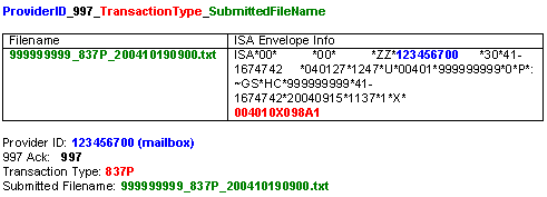
The value in ISA06 of the submitted file envelope information is used to determine the ProviderID and the value in GS08 is used to determine the Transaction Type.
Please limit your Submitted file name to less than 150 characters. To assure access to the 999, the following characters should not be used in your Submitted file name (837, 270, etc.):
# % & * + | : “ < > ? \ /
In special, limited circumstances the 999 will appear differently – most likely based upon a call made to our Help Desk.
X12 testing
1. I tried to submit a batch of test claims or production claims and immediately received an error about a duplicate file name.
DHS requires providers to submit every batch with a unique file name. Consult file naming conventions in the Secure FTP Guide.
Remittance Advice (RA)
1. I’m not receiving my X12 835 RA in my MN–ITS mailbox.
You may not have completed the testing process with the HIPAA Collaborative or DHS, and may not be submitting production-ready claims transactions. Review Test 5010 Batch Transactions on the 5010/D.0 Compliance page.
2. When will my PDF RA appear in my MN–ITS mailbox.
RAs appear in the MN–ITS mailbox on the Thursday following the billing cycle. Refer to the Payment and Claim Cut-Off Calendars at the bottom of the MHCP billing resources webpage. If it does not appear by this time:· Check your “Messages” folder in your MN–ITS mailbox to determine if you received a message about a delay in distribution of RAs. · Contact the MHCP Provider Resource Center at 651-431-2700 or 800-366-5411.
3. I can’t open or retrieve my PDF RA file.
You may need a more current version of a PDF reader program installed on your PC or you may need to change the program’s preferences.
4. My PDF RA file is appearing as scrambled lines.
Open any RA on the computer screen. Then go to the top under “Edit,” then at the bottom, click “Preferences,” and then on the left side of the screen, make sure “Page Display” is highlighted. In the middle of the page, make sure that “Use Greek Text Below” is UNCHECKED. Click “OK” and this should resolve the issue.
5. I want to direct my RA to the mailbox of another provider/biller.
That other provider/biller must be registered for MN–ITS. Refer to MN–ITS DDE & X12 Transactions on the 5010/D.0 Compliance page.
6. I want to change my RA from NSF to X12 835.
Contact the MHCP Provider Resource Center at 651-431-2700 or 800-366-5411.
Virtual Desktop Users
Some virtual desktop internet browsers may be incompatible with MN–ITS. If some MN–ITS functions, such as action buttons, are not appearing correctly while you are using a virtual desktop environment, contact your IT staff to get a different internet browser or a browser version that is compatible with MN–ITS.

 Report this page