
1095-B File Instructions for Servicing Agencies
Minnesota Health Care Programs (MHCP) sends 1095-B data files to the MN–ITS mailbox of each servicing agency. The Excel file contains information that was reported on each Form 1095-B, for cases that are assigned to that servicing agency. Each agency will receive the following two types of files:
Refer to this user guide for the following information regarding the file:
MN–ITS User Access
If you do not have access to MN–ITS or the Miscellaneous Received mailbox, contact your organization’s MN–ITS Primary Administrator to request a user account and access to Provider Data Share in the User Access options for Mailbox Folders.
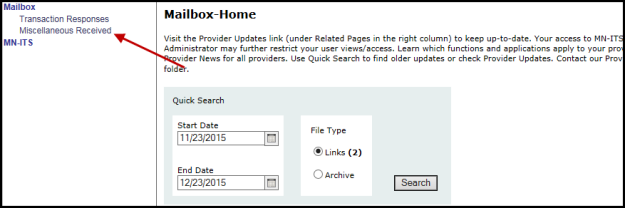
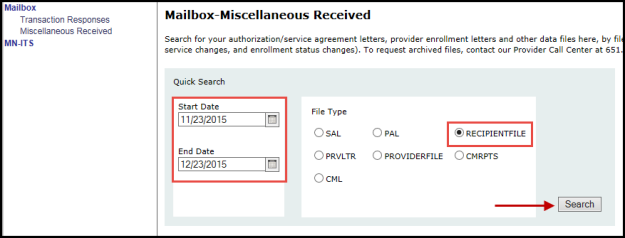
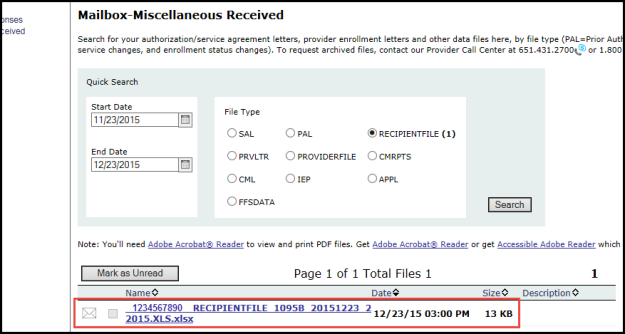
Locating the file in your MN–ITS mailbox
Use the following instructions to locate the 1095-B file in your MN–ITS mailbox:
Considerations for Secure FTP file transfer
Some agencies use a Secure FTP connection to receive files from the MN–ITS mailbox servers. If your agency uses a Secure FTP process, contact your IT staff to discuss any adjustments that may be needed to retrieve 1095-B files. For more questions about setting up an FTP connection, IT staff can contact the MHCP Provider Call Center at 651-431-2700 or 800-366-5411, and ask to be directed to the EDI Tier 2 group.
MHCP Recommendations
User Access
MN–ITS access is most likely designated to a few staff members in your agency. Whether you use Secure FTP or direct MN–ITS access to retrieve the 1095-B data files, we recommend you download and place the file somewhere in a shared location on your network. Any worker you designate can then access and view the file from that location.
Combining Data
After the original data file, we will send subsequent files which will only contain new data for forms generated in the weekly correction runs. These subsequent files cannot be used as a full replacement for the original or any previous files. We recommend that your agency develop a single spreadsheet or database to merge incoming data on subsequent files with data on the original and previous files.
 Report this page